Work with agents through Bots on your own Host
Ramulbot organizes conversations, task runs, and generated files into dedicated Bots. Your own Host runs work through the provider you configure and stays in sync across desktop, mobile, and the CLI.
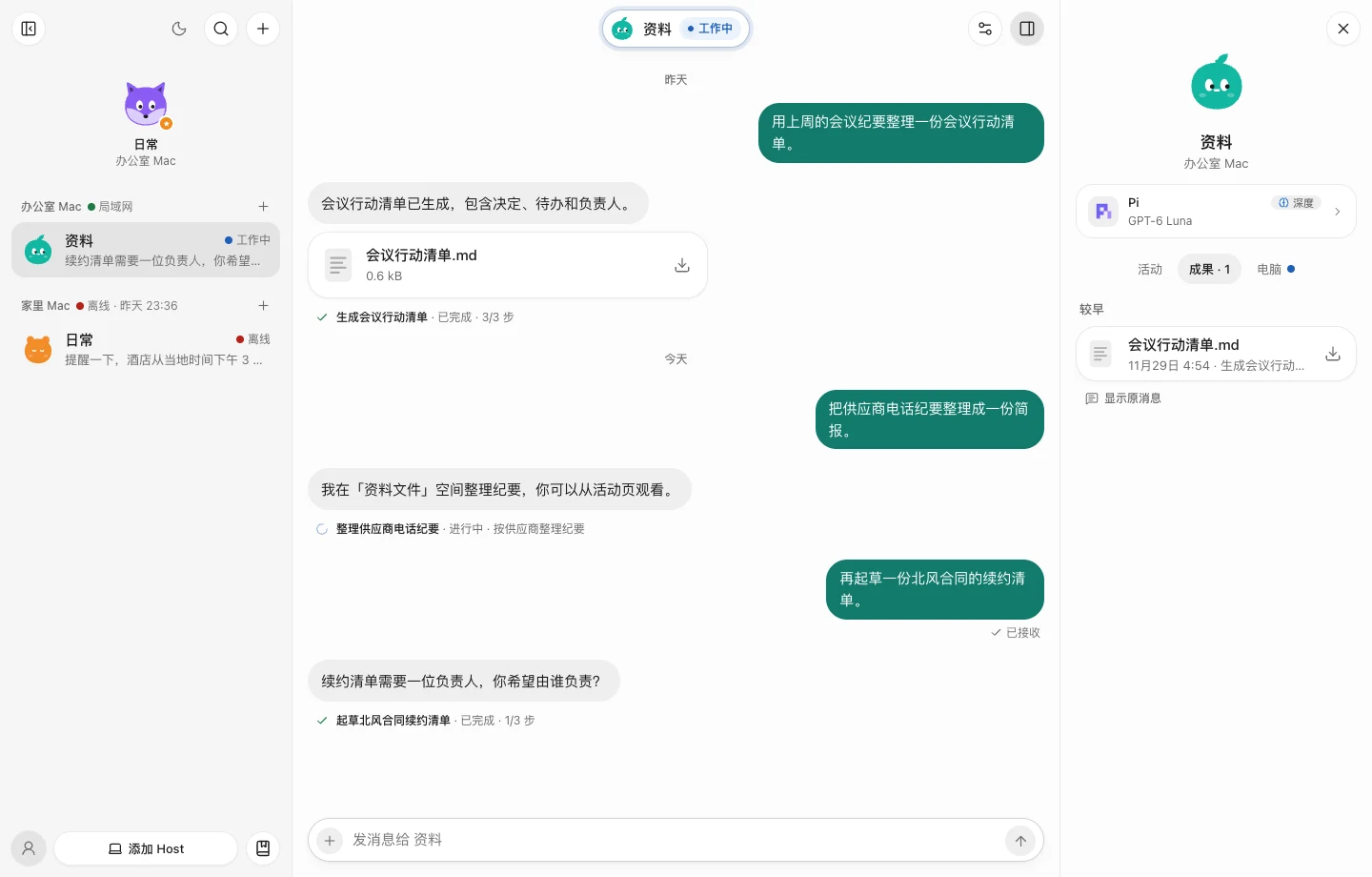

How the pieces fit
The Ramulbot Host runs on your computer and stores your Bot conversations, workspace files, and outputs there.
- Bots
- Each Bot holds one conversation stream, its own workspace directory, task runs, and produced artifacts. Separate Bots keep distinct projects from mixing context.
- Your Host
- Runs on your own computer. The Host executes tasks with the provider you configure, keeps conversation and workspace state locally, and continues accepted runs even after you close the window.
- Desktop, mobile, and CLI
- Work directly on desktop, pair a phone to follow runs and review outputs away from your desk, or drive tasks and fetch artifacts from the terminal with ramulbot. Every surface shares the same Bot stream.
- Configured providers
- Connect the agent runtimes already set up on your Host. Choose a provider and model per Bot, and switch runtimes later without discarding the Bot's chat history or files.
One Bot stream across desktop, phone, and terminal
Open the same Bot on any connected device to view attachments, answer questions, and download its latest files.
- Attach source files and send a task from desktop or the CLI. Your Host records the request and starts the provider.
- Check run activity, answer follow-up questions, or open generated Markdown and files from a paired phone.
- Wait for completion or download published artifacts straight into your local directory using independent CLI commands.
ramulbot host list
ramulbot --host local bot list
ramulbot --host local message send --bot "$BOT" \
  --text 'Summarize decisions and action items from these notes' --attach notes.md
ramulbot --host local artifact list --bot "$BOT"
Each CLI command runs independently and shares the selected Bot's chat and artifacts with desktop and mobile.
Privacy and provider boundaries
A direct look at what stays on your Host, what reaches the model provider you choose, and the current stage of the project.
What stays on your Host
Your Host stores Bot conversations, workspace files, attachments, and artifacts on your computer.
What goes to your configured provider
The Host passes the task and any required context to your Bot's configured provider. For online models, the provider's terms govern how it processes and retains data.
Device access and pairing scope
Devices connect directly over HTTPS on LAN or Tailscale with verified Host identity, or over an end-to-end encrypted Relay when away. Invitations can grant full Host access or restrict a device to selected Bots, and any device can be revoked.
Current project status
Ramulbot is an unreleased personal project. These guides cover local and workspace setups. Interfaces, CLI options, and local data layouts may change as the project develops.